What’s New in V12
PDF/X Output
Office Server Document Converter supports output in PDF/X-1a, PDF/X-3, PDF/X-4, and PDF/X-4p formats.
PDF/X is defined in ISO 15930 and is a subset of PDF intended for data exchange for printing.
Specifying the PDF/X Format
Use the -pdfver parameter to specify the PDF version to be created. For example, to output PDF/X-1a:2001:
-pdfver PDF/X-1a:2001
Features of PDF/X
| Feature or Requirement | PDF/X-1a | PDF/X-3 | PDF/X-4 | PDF/X-4p |
|---|---|---|---|---|
| All fonts must be embedded. | ○ | ○ | ○ | ○ |
| An output intent must be specified. | ○ | ○ | ○ | ○ |
| The ICC profile specified as the output intent must be embedded. | × | × | ○ | × |
| Supports CMYK and spot color. | ○ | ○ | ○ | ○ |
| Supports grayscale. | ○ | ○ | ○ | ○ |
| Supports RGB. | × | ○ | ○ | ○ |
| Supports transparency. | × | × | ○ | ○ |
| You may set passwords, restrict printing, and restrict changes. | × | × | × | × |
| You may include links and annotations. | × | × | × | × |
| You may include elements that involve actions, such as bookmarks. | × | × | × | × |
○ = Statement applies. × = Statement does not apply.
Output Intent and ICC Profile Specification
PDF/X requires an output intent to be specified. For PDF/X-4 output, embedding an ICC profile is mandatory. Use the following command-line parameter and option configuration file attributes to specify the output intent and control ICC profile embedding.
Command-Line Parameter: -pdfprofile
Specifies the ICC profile to use by its full path.
-pdfprofile "C:\Windows\System32\spool\drivers\color\JapanColor2001Coated.icc"
Option Configuration File: default-output-intent
Specifies the output intent. You can specify an ICC profile directly, or specify an ICC profile together with an output condition identifier.
Example: Specifying an ICC profile directly
<?xml version="1.0"?>
<formatter-config>
  <pdf-settings
    default-output-intent="url('file:///C:/Windows/System32/spool/drivers/color/JapanColor2001Coated.icc')" />
</formatter-config>
Example: Specifying an ICC profile and output condition identifier
<?xml version="1.0"?>
<formatter-config>
  <pdf-settings
    default-output-intent="url('file:///C:/Windows/System32/spool/drivers/color/JapanColor2001Coated.icc#OutputConditionIdentifier=JC200103')" />
</formatter-config>
ICC Profile Embedding
The embed-std-output-intent attribute in the option configuration file specifies whether to embed the ICC profile in PDF/X output.
PDF/X-4: This setting has no effect because embedding the ICC profile is mandatory.
Support for 3D Effects
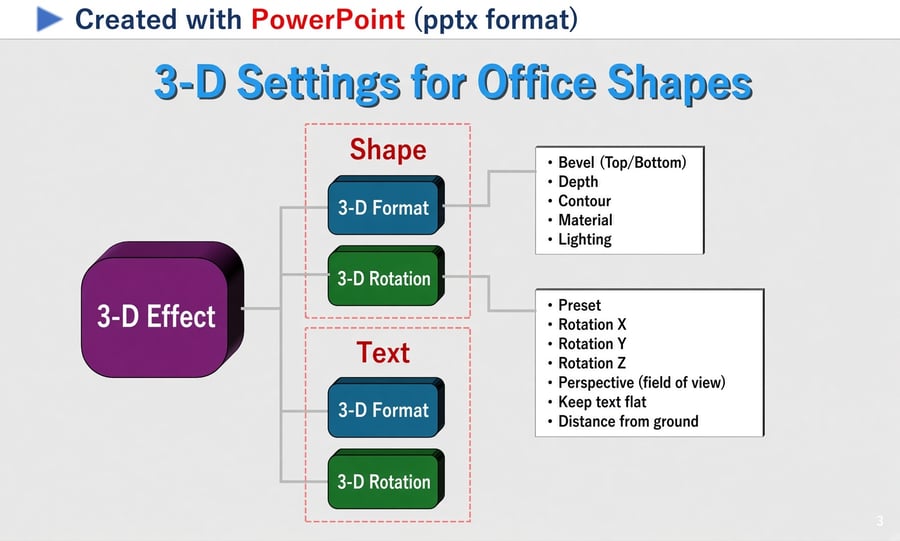
OSDC V12.0 adds support for reproducing 3D effects applied to shapes and text in Word (.docx), Excel (.xlsx), and PowerPoint (.pptx) documents.
From project titles to three-dimensional graphic elements, this enhancement helps preserve the depth and visual appearance intended by the document creator during conversion.
Supported 3D Effects
The following 3D Format and 3D Rotation settings are supported, subject to the restrictions below.
3D Format
3D Rotation
Comparison of OSDC V11.1 and OSDC V12.0
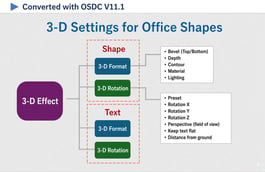
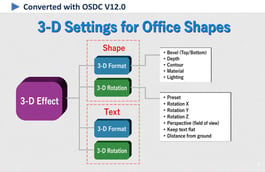
The following examples compare the original PowerPoint (.pptx) document containing 3D effects with the output produced by OSDC V11.1 and OSDC V12.0.
Original PowerPoint
OSDC V11.1
OSDC V12.0
Restrictions
Word (DOCX) Conversion Improvements
OSDC V12.0 adds support for line number output, improves the appearance of table border junctions, and introduces an option to avoid unnecessary second-pass conversions when correcting page numbers.
Line Number Output Support
Line number output now supports various numbering settings, including continuous numbering and page- or section-specific settings. Line numbers are also preserved in complex layouts, such as documents with multiple columns.
To hide line numbers in the output, specify the following command-line parameter:
-docnonlinenumber
The following examples show the original Word document and OSDC V12.0 output with line numbers displayed or hidden.
Original Word Document
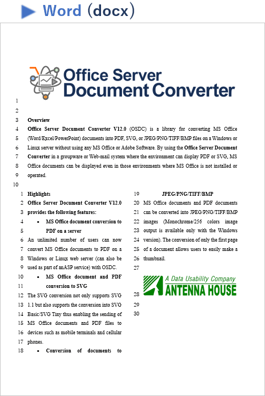
OSDC V12.0
Line Numbers Displayed
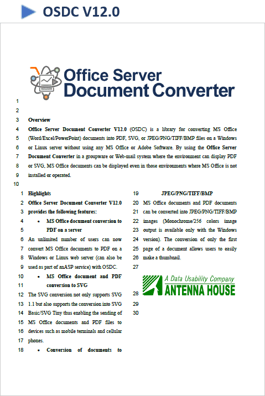
OSDC V12.0
Line Numbers Hidden
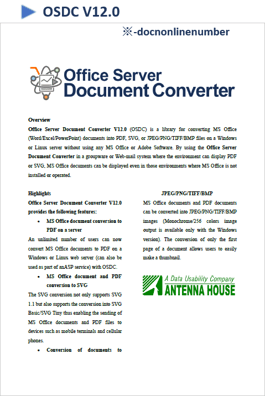
Improved Table Border Junctions
The appearance of junctions between double and triple table borders has been improved, producing cleaner connections where border lines meet.
Conditional Second-Pass Conversion
The -docpagenumbercorrection parameter updates page numbers in the table of contents and the total page count. Previously, using this parameter always performed two conversion passes, even when the document did not contain either item.
The new conditional-2nd-pass option allows OSDC to determine whether a second pass is necessary and skip it for documents that do not require these corrections.
conditional-2nd-pass
Processing time: When a second conversion pass is required, setting this option to true may result in slightly longer processing time.
Excel (XLSX) Conversion Improvements
OSDC V12.0 enhances support for displaying form controls and adds support for external hyperlinks in Excel (.xlsx) documents.
Enhanced Support for Form Controls
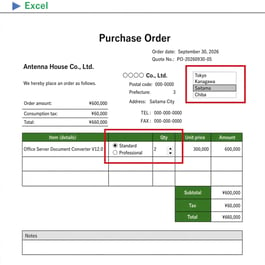
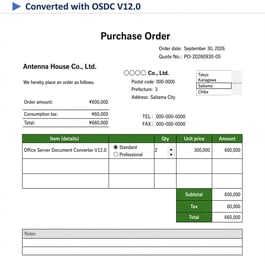
In addition to the previously supported checkboxes and combo boxes, OSDC V12.0 now supports displaying the following form controls:
Display differences: Text direction, formatting, and other visual details may differ from their appearance in Excel.
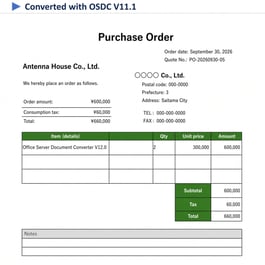
Comparison of OSDC V11.1 and OSDC V12.0
The following examples compare the original Excel (.xlsx) document with the output produced by OSDC V11.1 and OSDC V12.0.
Areas containing form controls are circled in red in the original Excel example.
Original Excel Document
OSDC V11.1
OSDC V12.0
Support for External Hyperlinks
OSDC V12.0 adds support for external hyperlinks in Excel documents, including links to:
Text File Conversion Improvements
OSDC V12.0 adds an option to specify a preferred encoding for text file conversion and improves detection by giving priority to the Byte Order Mark (BOM).
Preferred Encoding for Detection
OSDC automatically detects the character encoding when converting text files. However, incorrect detection can sometimes result in garbled characters. The new preferred-encoding option allows you to specify which encoding should be prioritized during detection.
preferred-encoding
Example option configuration file: Prioritize Shift_JIS when detecting the text file encoding.
<?xml version="1.0"?>
<formatter-config>
  <dfv-settings preferred-encoding="Shift_JIS" />
</formatter-config>
Improved BOM Detection
When a text file contains a Byte Order Mark (BOM), OSDC now gives it the highest priority when determining the encoding for conversion.
EMF+ Rendering Support
In addition to existing support for the EMF format, OSDC V12.0 adds support for rendering EMF+ (Enhanced Metafile Format Plus).
Restrictions
Additional Parameters and Options
OSDC V12.0 adds the following parameters and option settings to control page order, transparency, metadata encryption, and PDF/A or PDF/X compliance handling.
Reverse Page Order
The new -prevp command-line parameter outputs pages in reverse order.
-prevp
Transparency Handling
The new transparency option specifies whether to convert transparency to opacity when outputting to PDF.
PDF Metadata Encryption
The new encrypt-metadata option and -nemd command-line parameter control whether metadata is also encrypted when encrypting a PDF.
PDF/A and PDF/X Compliance Handling
The new error-on-pdfx-fault option specifies whether to continue processing when a document does not comply with PDF/A or PDF/X requirements.
For more information on the features implemented in previous versions of Office Server Document Converter, see the following links.



Awards


Proud Member



Contact
Privacy Policy | © 2026 Antenna House, Inc.